Sleigh Outline Icons: Minimalist Icon Set for Any Project
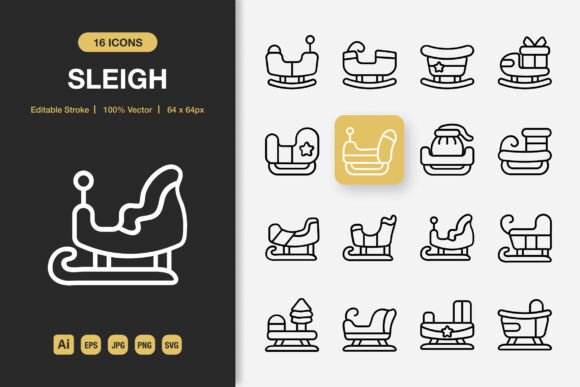
Visual communication works best when it’s clear, direct, and free of distraction. Icons play a huge role in guiding attention, simplifying complex ideas, and adding personality to a design. The Sleigh Outline Icons set takes that concept and delivers a collection of high-quality, minimalist outline icons that slot easily into any project. At its heart, the pack features a charming sleigh design, but it also includes a broad set of versatile symbols that fit right alongside it. What you get is a carefully balanced mix of seasonal charm and everyday usefulness, all wrapped in a crisp, editable format.
Why Minimalist Icon Design Keeps Your Work Clean and Readable
Minimalist icon design strips away everything that isn’t necessary. The Sleigh Outline Icons follow this principle with thin, consistent strokes that look elegant on light and dark backgrounds alike. Because the icons stay away from heavy fills or overly intricate details, they help keep your message front and center. This kind of understated style works especially well when you need a consistent visual language across multiple screens, pages, or printed pieces. The collection is built around a set of 100 customizable icons, so you’ll find a healthy balance of sleigh-related motifs and broader, more universal symbols that prevent the pack from feeling one‑note.
Editable Stroke Brings Flexibility From the Start
A standout feature is the editable stroke on every icon. When you open the included Adobe Illustrator source file, the lines aren’t baked into a flat, unchangeable shape. You can adjust the stroke weight, change the color, or even change the cap and corner styles to match a brand’s aesthetic. That level of control matters a lot when you need icons to feel like a native part of your design, not something you settled for.
Where You Can Use the Sleigh Outline Icons in Everyday Projects
One of the most practical things about this set is how easily it moves between digital and print environments. A few examples show just how wide the window of use really is.
- Websites and mobile apps: Navigation icons, feature callouts, onboarding steps, and bottom‑tab indicators all benefit from the clean, readable shapes. The SVG files are lightweight and perfect for responsive layouts.
- Social media posts and stories: Drag one of the transparent PNGs directly onto a photo or a colored background. No white box appears, so the icon blends in as if it belongs there.
- Print materials like flyers, posters, and banners: Import the EPS or AI files into any professional design tool and scale them to poster size without losing a single sharp edge. The high‑quality vector base keeps everything crisp.
- Books, e‑books, and editorial layouts: Outline icons used as section markers, margin notes, or chapter dividers add a subtle, refined touch that doesn’t compete with the text.
- Infographics and business presentations: Small, readable icons keep data visualizations tidy and help explain points at a glance.
Whether you’re working in a busy marketing team or putting together a personal blog, the easy drag and drop nature of the included PNG files means you can see results quickly without needing a deep knowledge of vector software. For those comfortable with Illustrator, the source files unlock even more possibilities.
A Close Look at the Files Inside the Download
When you unzip the folder, you won’t have to guess which file does what. The Sleigh Outline Icons pack arrives with a clearly organized set of formats, and a simple readme.txt explains everything in plain language. Here’s what you’ll find:
- Adobe Illustrator source file – The main editable document where all icons live on organized layers. This is where you can fully customize strokes, colors, and shapes.
- EPS Version 10 file – A broadly compatible vector format that works with older versions of Illustrator, CorelDRAW, and many other design apps.
- SVG file – Ready for the web. Import it directly into WordPress, Figma, or any code editor for crisp, infinitely scalable icons that load fast.
- PNG transparency files – Pre‑rendered images at high resolution with a clear background. Just drag them into Canva, PowerPoint, Google Slides, or a simple document editor and place them exactly where you need them.
- JPG file – A flat preview version for quick reference or for use in contexts where transparency isn’t required.
Having all these formats in one package means you don’t need to convert anything yourself. The high‑quality rendering stays consistent across every format, and the editable nature of the vector files doesn’t lock you into a single look.
Making the Icons Truly Your Own Through Customization
Customization doesn’t have to be complicated. If you just need a quick color tweak, open the SVG or AI file, select the icon, and pick a new stroke color. Want a thicker line for a bolder statement? Increase the stroke weight in one click. Because the icons are 100 customizable, you can even combine elements from different icons to build something new without starting from scratch.
The transparent PNG files give non‑designers plenty of room to play, too. You can layer an icon over an image, place it inside a colored circle, or stack multiple icons to create a unique badge. None of that requires specialized skills. The Sleigh Outline Icons set tries to meet you at your skill level, whether you’re a seasoned graphic designer or someone learning the ropes.
Building a Cohesive Look Across Your Brand Touchpoints
One hidden advantage of a well‑designed icon set is consistency. When you pull from the same collection for your website header, your Instagram template, and a printed flyer, your brand starts to feel more put‑together. The Sleigh Outline Icons share a uniform stroke weight, similar proportions, and a consistent line style. That cohesion helps even a small business or a side project look professional and intentional.
Imagine using a sleigh icon as a subtle, seasonal accent on a holiday sale landing page, then echoing that same icon on a thank‑you card included with shipped orders. The visual thread is quiet but powerful. And because you’re not searching through mismatched free icons from different places, you save time and avoid the patchwork look that can creep into rushed designs.
Things to Consider Before Choosing Any Icon Set
No icon pack fits every single need perfectly. With the Sleigh Outline Icons set, there are a few points worth thinking about so you can use it with confidence. First, check the licensing terms outlined in the included readme.txt file. The document spells out what’s allowed for personal and commercial projects, so you’re never left guessing.
Next, consider the tools you have on hand. While the PNG files work almost anywhere, making full use of the editable stroke feature and the layered Illustrator file does require access to vector editing software such as Adobe Illustrator, Affinity Designer, or Inkscape. The EPS Version 10 format helps bridge the gap if you’re on an older system or collaborating with someone who uses different software.
Also, think about the style you need. The Sleigh Outline Icons lean into a thin, refined, minimalist look. That works beautifully for clean, modern designs, but if your project calls for a chunky, cartoon‑like feel or heavy drop shadows, these icons might feel out of place. Fortunately, the set’s versatility means the universal symbols won’t feel tied to a single season, so they can stay in your toolkit year‑round even after the winter themes fade away.
How to Use the Sleigh Outline Icons Right Out of the Box
Getting started is straightforward. If you’re working on a presentation or a simple social media graphic, grab a PNG file with transparency, drop it into your layout software, and position it. The icon will appear cleanly over any background. For a website, upload the SVG file and set its size with CSS or a page builder—no pixelation worries at any screen resolution. Print projects benefit from the AI or EPS files placed into InDesign, Illustrator, or similar tools, where you can convert the color space to CMYK and fine‑tune the line work.
Many users find that the easiest first step is to browse through the included icons and pick out five or six that match a current project. By limiting your initial selection, you can focus on how the icons work together rather than getting lost in the full set. The readme.txt file will guide you on file structure, and from there, a few test placements usually get the creative ball rolling.
Creating Meaningful Visual Cues Without Adding Noise
Good icons don’t just decorate a page; they lead the eye and clarify meaning. The Sleigh Outline Icons give you that ability without stealing attention. A small sleigh icon next to a “Winter Collection” headline instantly communicates a seasonal theme, while a simple envelope outline beside a “Contact Us” button performs a job that needs no extra explanation.
By keeping the style minimal and the strokes consistent, the set helps you build pages, apps, and prints where every element has a purpose. Beginners often worry that using icons might make a design look cluttered, but an outline approach actually does the opposite—it lightens the visual load while still adding smart touches.
Whether you’re refreshing a travel app, designing a printed invitation, or building out a blog post infographic, the Sleigh Outline Icons set gives you a flexible, high‑quality foundation. The mix of a signature sleigh element, plenty of general‑purpose symbols, and thoughtful file formats means you can jump into your next project with less guesswork and more creative momentum. Thanks for considering this set, and we truly hope you enjoy putting it to use.