A Practical Look at Grape Vector Illustrations in AI EPS Collections
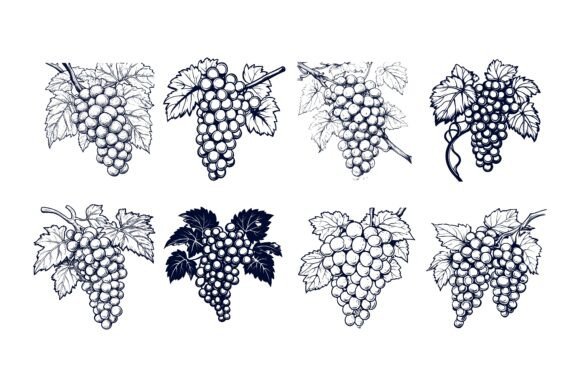
Finding reliable illustration assets that actually hold up under real design work is not always straightforward. Among the many themed sets available, grape illustrations stand out for their surprising versatility. Whether you are working on food packaging, wine branding, agricultural infographics, or seasonal marketing materials, a well-constructed grape illustration set can save hours of drawing time while giving you editable, scalable source files. This article takes a detailed look at what makes certain grape-focused AI and EPS collections worth your attention, how they perform in everyday projects, and where they might fall short.
What Actually Ships in a Grape Illustration Collection
When you download a grape-themed vector illustration pack, you typically receive files in three core formats: Adobe Illustrator (.AI), Encapsulated PostScript (.EPS), and high-resolution JPEG previews or flattened versions. The AI file serves as the primary working document for those using Illustrator. EPS acts as a widely compatible exchange format that imports cleanly into CorelDRAW, Affinity Designer, Inkscape, and older design software. The included JPG gives you a quick reference or a ready-to-use raster version when vectors are not required.
Having all three formats in one download is practical. You are not locked into a single software ecosystem. A designer on a Windows machine running CorelDRAW can work from the EPS while a Mac user opens the native AI file without conversion headaches. This cross-platform consideration is a small but meaningful detail, especially for teams where different members use different tools.
Organized Layers and Why That Matters More Than You Think
A grape illustration is not just a flat, single-object graphic. Bunches of grapes contain multiple berries, stems, leaves, and sometimes background elements. If these arrive as one merged mess, editing becomes tedious. A well-organized file separates components into clearly named layers: foreground grapes, background grapes, individual berries, leaf clusters, vine tendrils, and shadow or highlight overlays.
This layer discipline matters when you need to recolor only certain berries, remove a leaf that interferes with your layout, or extract a single grape for use as a standalone icon. Collections that advertise a neatly organized file and layer structure are signaling that the creator took the time to build a usable asset rather than just exporting a flattened vector trace. In practice, good layering can turn a 20-minute editing session into a 2-minute task. For production environments where speed translates directly to profitability, this is not trivial.
Detail Consistency Across the Set
One common frustration with themed illustration packs is inconsistency. You might find three beautifully rendered grape clusters and then a fourth that looks rushed, with mismatched stroke weights, different highlight styles, or noticeably different shading approaches. A quality grape illustration set maintains uniformity across all included graphics.
Consistency shows up in several ways: the same light source direction on all renderings, consistent use of gradients or flat color, uniform level of detail on leaves and stems, and matching berry proportions. When you use multiple illustrations from the same set in one project—a menu, a brochure, an infographic—this visual coherence prevents the work from looking patchy or haphazard. Buyers who inspect previews carefully can often spot consistency issues before purchasing. Look for uniform edge quality, consistent color palettes, and matching detail density across every preview thumbnail.
Suitable Applications Across Media Types
Grape vectors are not limited to wine labels. Their use extends further than many first assume. Because these files arrive as vectors, scaling is lossless. A grape icon can appear at 32 pixels on a mobile app button and also at 300 dpi across a large-format trade show banner without degradation.
- Print projects: Wine bottle labels, vineyard brochures, farmers market flyers, recipe cards, food magazine layouts, packaging for grape-based products.
- Web and digital: Blog post featured images, social media graphics, email newsletter headers, e-commerce product category icons.
- Apps and UI: Food delivery app menu icons, nutrition tracker symbols, recipe app illustrations.
- Infographics: Agricultural statistics, wine production data visualizations, nutritional comparison charts.
The fact that you can recolor grapes from deep purple to green, red, or even stylized gold means the same base illustration adapts to different grape varieties and design palettes. This flexibility multiplies the practical value of a single purchase.
Editability and Customization in Practice
A strong grape illustration set does not force you to accept the artwork as-is. You should be able to select individual berries, change their fill colors, adjust stroke properties, resize leaf elements, or reposition stems. Collections that use global swatches or well-structured compound paths make color changes especially efficient. Changing a purple Concord grape to a green Thompson seedless variety might be as simple as adjusting one or two swatch values if the file is properly built.
Some sets go further by including variations: whole bunches, half bunches, single grapes, grape slices, grapevine sections, and leaf-only elements. This modular approach lets you assemble custom compositions rather than relying solely on pre-arranged clusters. For designers who need to create a cohesive visual system across multiple touchpoints, this kind of component flexibility is genuinely useful.
Who Gains the Most From Grape Illustration Assets
Several distinct groups find practical value in well-made grape vector collections. Understanding where you fit can help determine if this type of asset aligns with your workflow.
Small business owners in food and beverage often handle their own marketing materials or work with tight budgets. A grape illustration set lets a small vineyard owner create professional-looking tasting notes, event flyers, and social posts without commissioning custom illustrations for each need.
Freelance graphic designers regularly need themed elements for client projects. Having a reliable grape set in the asset library means faster turnaround on wine-related or food-related briefs. The editable nature of AI and EPS files also means the designer can adapt the style to match existing brand guidelines.
Educators and content creators use these illustrations in presentations, worksheets, online courses, and educational materials about agriculture, botany, or nutrition. The clean, recognizable imagery helps communicate ideas without photographic clutter.
Marketers and social media managers working with food brands, restaurants, or beverage companies appreciate having a consistent visual toolkit. Grape illustrations can anchor a seasonal campaign, a harvest promotion, or a product launch.
Realistic Observations on Quality Variation
Not every grape vector set sold online meets professional standards. Some common shortcomings include auto-traced artwork with excessive anchor points that make editing cumbersome, poorly constructed compound paths that break when ungrouped, or EPS files that export incorrectly and fail to open in non-Adobe applications.
Another issue is over-rendering. Some grape illustrations apply heavy gradients, complex mesh shading, and elaborate highlights that look impressive in isolation but clash when placed alongside other design elements. A simpler, cleaner style often integrates more smoothly into varied layouts. Before purchasing, check if the preview shows the actual vector style or if it is a rasterized mockup that hides vector quality issues. Look for sets where the creator provides a sample or detailed close-up of the line work and anchor point density.
Long-Term Value and Reusability
Grape illustrations are not a one-project asset for most buyers. The seasonal nature of grape harvests, the recurring need for wine-related content, and the popularity of fruit imagery in food marketing mean these files often get used repeatedly across years. A collection purchased today for a harvest festival poster might reappear next year for a wine tasting invitation, then later for a blog infographic about antioxidant-rich foods.
This long-term reusability makes the quality of the source files especially important. Files that are well-organized today will still be easy to navigate when you open them two years later. Properly constructed EPS files will remain importable even as software versions change. Investing slightly more in a well-built set rather than the cheapest option often pays out over time.
What to Look for When Evaluating a Set
Based on real usage patterns, several indicators suggest a grape illustration collection is built for professional work rather than casual clip art:
- Transparent handling of file contents: The product description clearly states what is included—how many illustrations, what formats, whether variations are provided.
- Evidence of layer organization: Descriptions that mention layer structure specifically suggest the creator values usability, not just visual output.
- Cross-platform compatibility claims: Sets designed for both Mac and Windows users typically undergo testing that catches export issues.
- Realistic preview images: Previews showing the illustrations in context—on a label mockup, in an infographic layout—help you judge real-world suitability.
- Clear licensing terms: Understanding whether the illustrations can be used in commercial work, in template resale, or in logo design prevents legal headaches later.
Integrating Grape Illustrations Into Existing Workflows
Once you have a quality grape vector set, the practical question becomes how to use it efficiently. Most designers place the AI or EPS file as a linked asset in their primary design document, allowing non-destructive editing of the original. Color adjustments made in the source file propagate to all instances where the illustration is placed.
For web projects, exporting individual grape elements as SVG files preserves scalability and keeps file sizes small. For print, placing the vector directly into InDesign or Illustrator maintains crisp output at any resolution. The included JPG files serve as quick placement proxies during layout drafts, speeding up composition without slowing down the design application.
Common Pitfalls to Avoid
Even with well-made assets, certain mistakes reduce effectiveness. Overusing grape illustrations within a single project can make the design feel repetitive. When grape clusters appear in the hero image, the sidebar icon, the footer decoration, and the bullet points, the visual language becomes monotonous. Use the illustrations strategically—as accent elements, not wallpaper.
Another pitfall involves ignoring the surrounding design context. A highly detailed, gradient-heavy grape illustration may clash with an otherwise flat, minimalist brand identity. In such cases, simplifying the illustration by removing shading layers or reducing the color palette can bring it into alignment. The editability built into a good AI file makes this possible.
Making the Decision
Grape illustration collections occupy a specific but genuinely useful niche. They are not everyday assets for every designer, but for those whose work regularly intersects with food, beverage, agriculture, or seasonal marketing, they earn their place in the toolkit. The best sets combine clean vector construction, thoughtful organization, consistent detailing, and format flexibility. They work across platforms, adapt to different grape varieties through simple color edits, and scale from app icons to billboards without quality loss.
The availability of AI, EPS, and JPG formats in a single download, structured for both Mac and Windows environments, reflects an understanding of how real design teams operate. When the file arrives with clearly named layers and logically grouped elements, it signals that the creator built the asset for production use rather than just for display.
If your next project involves vineyard branding, food packaging, nutritional content, or any visual communication where grape imagery adds value, a carefully chosen vector set can reduce production time and maintain visual quality. The key is evaluating the set against your actual needs—checking previews, confirming format compatibility, and verifying the editing flexibility that the description promises. When those boxes are ticked, the collection becomes a practical resource that supports your work rather than complicating it.